

Their style, not just their words
A style profile from the whole export, and every bubble, sticker, GIF, reply and reaction replayed to the model as a tool call.
How it works
Talk to the people you miss.
Export a Telegram or WhatsApp chat. An LLM continues it in the style of one person, with their bubbles, stickers, GIFs, reactions and voice. On your computer, with any model, offline if you like.
A style profile from the whole export, and every bubble, sticker, GIF, reply and reaction replayed to the model as a tool call.
How it works
Chats stay in your data folder. With a local model and Offline mode on, the app refuses every request that would leave your computer.
Offline & privacy
120,000+ messages and 30,000 files import with live progress. A repeat import is spotted from the messages, before any media is uploaded.
Large exports
A media library that describes what was sent and transcribes voice, in the order you choose, stoppable at any time.
Photos & voice
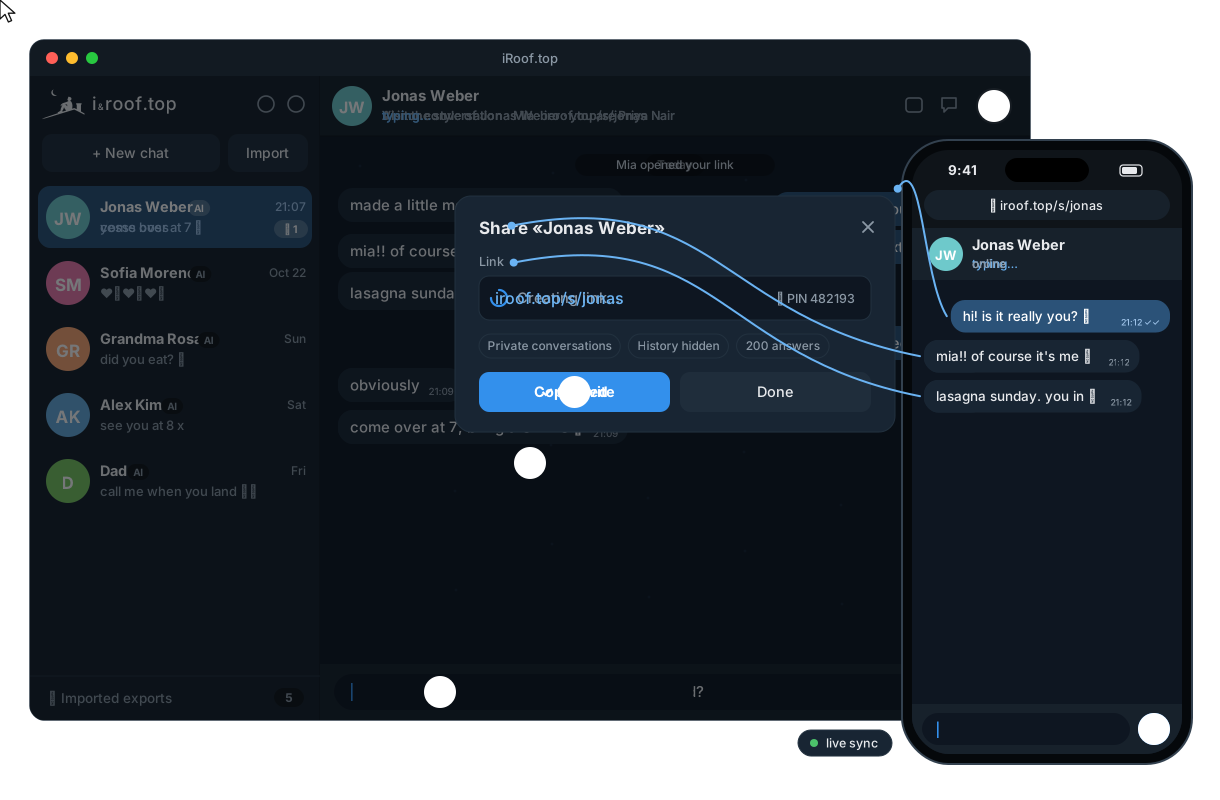
Let a friend talk to the persona at /s/name, with a PIN and limits, on your Wi‑Fi or at name.iroof.top.
Share links
Visitor messages land in your Telegram group. Reply yourself, or let the AI answer after a countdown.
Telegram
OpenAI, OpenRouter, Gemini, Ollama, LM Studio, llama.cpp… plus MCP tools over Streamable HTTP or stdio.
MCP tools
The exact JSON sent to the model is one click away, with its size, the history budget and the tokens used.
What's in the window
A Rust server with the web UI inside, desktop apps for macOS, Windows and Linux, Homebrew and a Docker image.
Install
brew install --cask irooftop/tap/irooftop   # macOS
# Windows and Linux: direct downloads under "Download the app" above
# Open the app, then Settings → model and key → Testbrew install irooftop/tap/rooftop
export OPENAI_API_KEY=… # OpenRouter by default, any OpenAI-compatible API works
rooftop # http://127.0.0.1:8080, then drop an export onto the pagedocker run -d -p 8080:8080 -e OPENAI_API_KEY=… \
-v rooftop-data:/data ghcr.io/irooftop/rooftopcargo install rooftop # Rust ≥ 1.88
OPENAI_API_KEY=… rooftopollama pull qwen3 # any local model with tool calling
OPENAI_BASE_URL=http://localhost:11434/v1 OPENAI_MODEL=qwen3 rooftop --offlineThen three steps: export a chat from Telegram Desktop or WhatsApp, drop the folder, .zip or .txt onto the page, and press New chat to pick who the AI plays: the other person, or yourself. No chat of your own at hand? Try the fictional ones: rooftop --import ./examples/telegram.
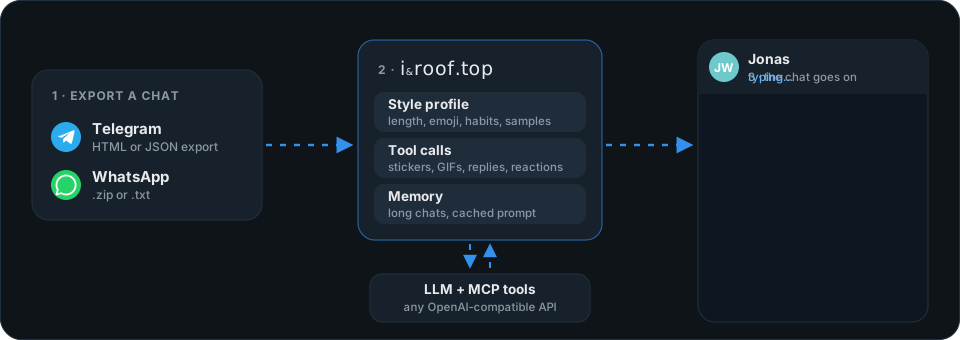
The export is read once, on your computer. Each reply sends the model a system prompt with the style profile, your notes and the media descriptions, then the most recent part of the chat that fits the history budget. Older parts are folded into a short memory, and the persona can still search them. The model answers with tool calls (send_message, send_sticker, react…), which become bubbles, stickers and reactions. More →
| Network | |
|---|---|
| Importing, the style profile, search, storage | none: it all happens on your computer |
| A reply, a memory summary | the model endpoint you choose, and nothing else |
| Describing media, transcribing voice | the media model, only when you press Describe |
| Share links over the internet, Telegram | only if you turn them on; Offline mode turns them off |
Any chat model with tool calling behind an OpenAI-compatible /chat/completions endpoint. Bigger models imitate a style better. For Describe in the media library, the media model must also accept images (and audio for voice messages). Test in Settings tells you in plain words what is wrong, e.g. a rejected key or an unknown model.
Nothing with a local model. With a cloud model you pay your provider per token: a reply costs about one history budget of input (120,000 characters ≈ 34k tokens by default; the prompt is built to stay cacheable, so providers with prompt caching bill most of it at the cached rate) plus a few short tool calls. Lower the budget in Settings to pay less per reply.
No. Exports of 120,000+ messages and 13 GB of media import fine, from the browser or with rooftop --import <folder>. The search and the history budget keep each reply's prompt the same size, however long the chat is.
Yes, with a share link: on your Wi‑Fi, or over the internet at name.iroof.top, with a PIN and message limits. Visitors see the chat only: no settings, notes, prompts or other chats.
A note on care
This is meant for staying close to people who are far away. The persona stays in character but answers honestly if you sincerely ask whether you are talking to an AI, and responds with care if you seem to be in distress.